
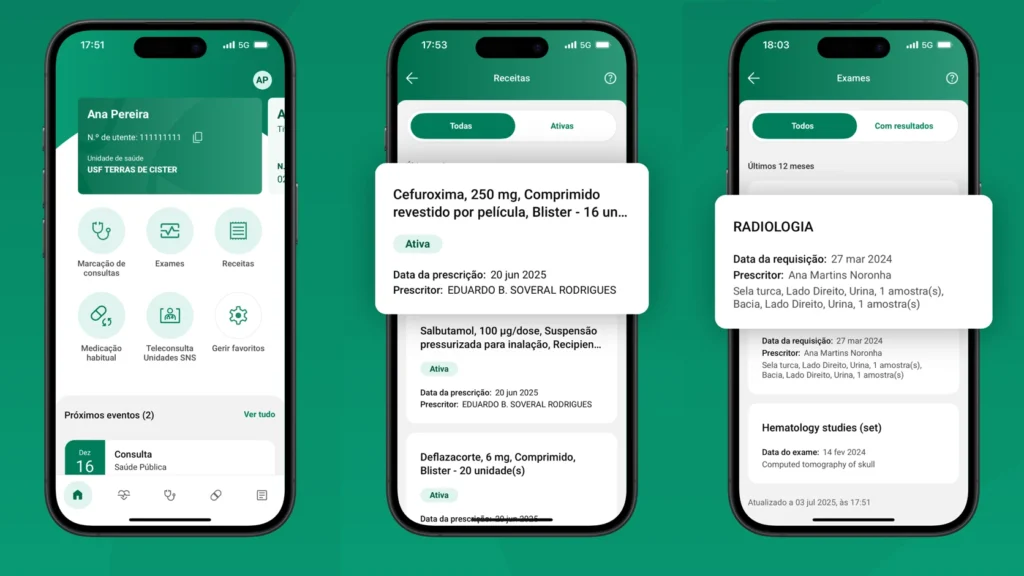
You do not always have to go to the centro de saúde — the health centre — for a copy of a prescription, your test results or proof that you saw a doctor. Many of these documents are available on your phone in the SNS 24 app. It is also where you can see your vaccination history and find a dental voucher issued to you. The app is used to send appointment requests and to ask for a repeat prescription as well.
SNS 24 is a service of Portugal’s National Health Service — Serviço Nacional de Saúde, or SNS. It brings together a phone line, a website and an app. By phone you can have your symptoms assessed and be told where to go for care. The website and the app give you access to your medical data and let you send requests to your own health unit.
The app was completely rebuilt in 2025. The September 2026 version added requests to book exams and a log of who has accessed your medical data. Here is what you can sort out through the app, from getting a prescription to seeing a dentist.
Who can use the app?
Anyone with a número de utente — a patient number in the public system — can use the SNS 24 app, including foreigners and people who have no family doctor assigned.
You can sign in with Chave Móvel Digital — the state digital ID — or with your patient number. In the second case you will need the phone number or email recorded in the patient register. The sign-in options are described on the SNS 24 sign-in page.
We explained how to register with the SNS and get care without a family doctor in a separate article.
Which languages does the app work in?
The SNS 24 app works in Portuguese and English. The official screens show the interface in Portuguese, and the app’s iPhone listing also names English. The language setting is in Configurações — “Settings”, under Idioma — “Language”. Below we give the Portuguese names of the sections with a translation.
Where do I find a prescription, and how do I renew it?
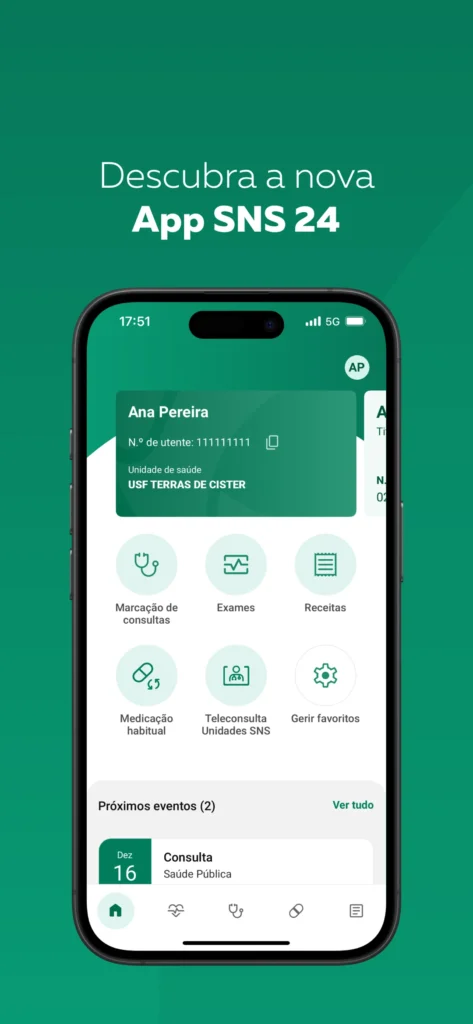
Electronic prescriptions a doctor has already issued are in the Receitas — “Prescriptions” — section. Each entry lists the prescribed medicines and the details you need to collect them at a pharmacy.
A repeat prescription goes through Medicação habitual — “Regular medication”. There you can ask for a renewal of medication registered as long-term, without booking a separate appointment just for a new prescription.
The health centre reviews the request, and the approved medicines appear in Receitas.
Where can I see referrals and exam results?
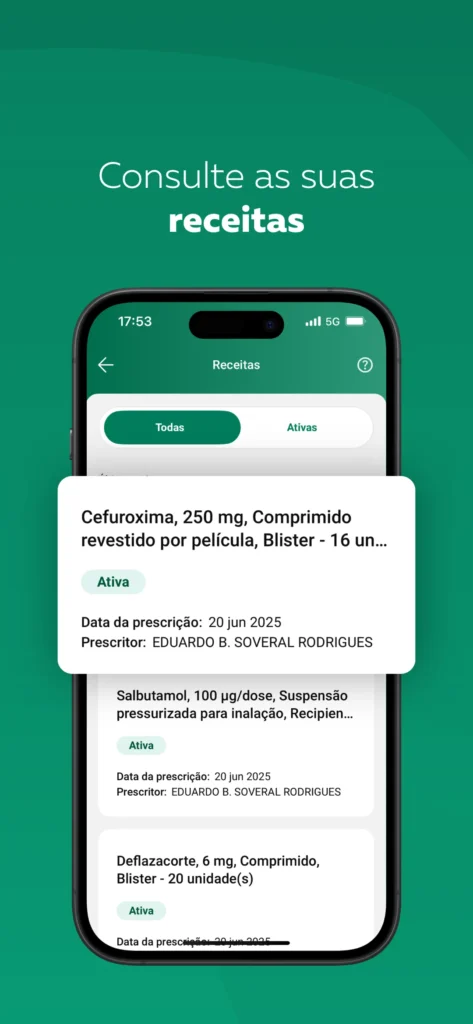
Referrals and exam results are gathered in Exames — “Exams”: the section holds electronic referrals and the results that connected healthcare providers have passed on to SNS 24. How complete your history is therefore depends on where you had the exam and whether the clinic shared the data.
If a result is missing, ask the laboratory or clinic whether it is available through SNS 24. A private provider may have its own patient portal where you need to collect the document.
If a referral has already been issued, you can also request a booking through Agendamento de exames — “Exam scheduling”. This feature arrived with the September update. It covers exams on an SNS referral at providers that have a contract with the state. You choose the exam and the provider in the service, and the booking counts as made once it is confirmed.
Can I book a doctor’s appointment?
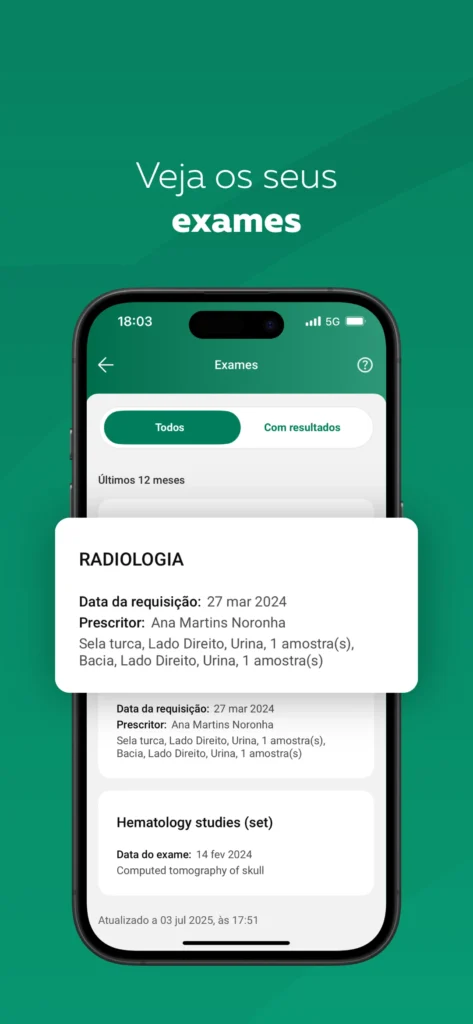
Yes, you can: the Marcação de consultas — “Appointment booking” — section lets you request a consultation at your primary care unit. That is the centro de saúde where you are registered. The types of appointment and the times on offer depend on how that particular centre works.
You do not need a family doctor to book — any available doctor at the centre will see you, and if online booking is not offered, you can go to the centre in person or call it. Consultations with hospital specialists are usually arranged by referral.
Scheduled appointments appear on the home screen under Próximos eventos — “Upcoming events” — with the date, time and place. A request you have sent is not yet an appointment: it counts as booked once the centre confirms it.
An SNS teleconsultation — a video appointment with a healthcare professional — also takes place in the app, if your health unit has scheduled one.
Can I see my vaccination history?
You can see your vaccination history in Boletim de vacinas — the “Vaccination record”: it shows the vaccines registered in the Portuguese system. It tells you when each vaccine was given and which ones are already on record.
To add vaccines you had abroad, you need to hand the supporting documents to your health centre. The vaccination staff will check your history and enter the details in the system.
Which medical certificates can I get online?
Online you can get a sick note, a self-declaration of illness, proof of attendance and a pregnancy certificate. Sick notes issued by a doctor are available in the app. In Portuguese this is the Certificado de Incapacidade Temporária, or CIT — a certificate of temporary incapacity for work. There is no need to go and fetch a paper copy.
If you miss work through illness for only a few days, a doctor’s note is not required: an Autodeclaração de doença — a self-declaration of illness — is enough. It covers up to three consecutive days, but can be used no more than twice in a calendar year.
After a visit to an SNS hospital service you can get a Declaração de presença — proof of attendance. The app also has the Certificado de Gravidez — a pregnancy certificate, for a pregnancy that is already registered in the system.
How do I use dental care through SNS 24?
Treatment under the state programme is provided through cheques-dentista — dental vouchers. In the app you can find them in the Saúde oral — “Oral health” — section. A voucher entitles you to the free check-ups and treatment the programme covers. You can use it with dentists who take part in the programme, including those in private clinics.
Vouchers are provided for children and teenagers under 18 through the age-based programme. Adult recipients include pregnant women followed in the SNS, people with HIV and patients at higher risk of oral cancer. Older people who receive the Complemento Solidário para Idosos — a benefit for those on low incomes — get them too. From 1 January 2027, when the age-based programme extends to 18-year-olds, new programme rules come into force.
If a voucher has already been issued, open its details and check the expiry date. The first voucher issued can be saved as a PDF. Then choose a dentist from the national list of participants and book directly with the clinic; how the programme works at present is set out on the SNS oral health page. When you book, say that you will be using a cheque-dentista. Bring the voucher details and an identity document to the appointment.
If you belong to one of the eligible groups but have no voucher, contact your health centre. It will check your entitlement and explain how vouchers are issued.
After treatment you can look up the details in Boletim de Saúde Oral — the “Oral health record”. It holds the history of your consultations, treatment plans, completed procedures and issued vouchers.
Where do I turn if data is missing or sign-in does not work?
If a prescription, vaccine or result you were given does not show in the app, ask the healthcare provider whether it passed the record on to the system.
If the app throws an error, its developer SPMS recommends updating it, signing out and signing in again. If that does not help, call 808 24 24 24 and choose option 5 — administrative services. The steps are described on the support page.
Help with signing in and with digital services is available at a Balcão SNS 24 — a service desk. You can find the nearest one in the official list of Balcões SNS 24.
The same number, 808 24 24 24, will help you assess symptoms and tell you where to go. Almost everything that used to mean a trip to the health centre is now in the app. If something is missing from it, ask the provider that treated you: it is the one responsible for that data.